
6NNN withdrawal: limits, timings, and why requests fail
Open the 6NNN Withdraw tab, confirm the Rollover requirement reads 0.00, choose JazzCash, Easypaisa or Bank, add a withdrawal account registered in your own name, then request between Rs 100 and Rs 50,000. Requests to mobile wallets typically process the same day. If your balance is positive but the 6NNN withdraw fails, the cause is almost always outstanding rollover rather than a fault.
This is the page most people need and the one the rest of this niche does not bother to write. Search for "6NNN withdrawal" and you get homepages with a paragraph buried two-thirds of the way down, usually a combined "deposit and withdraw" section that treats both as the same operation. They are not the same operation. Depositing is frictionless by design. Withdrawing has conditions, and this page is about those conditions.
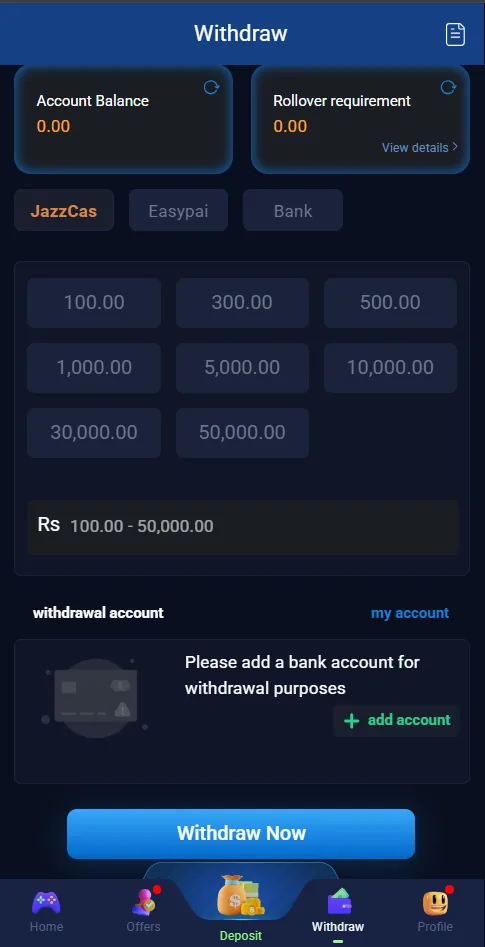
6NNN withdraw limits and payment methods
| Item | Value |
|---|---|
| Minimum per request | Rs 100 |
| Maximum per request | Rs 50,000 |
| Preset amounts | 100 · 300 · 500 · 1,000 · 5,000 · 10,000 · 30,000 · 50,000 |
| Methods | JazzCash · Easypaisa · Bank transfer |
| Platform fee shown | None on the presets |
| Account name must match | Yes — strictly enforced |
Three methods sit in a tab row under the balance cards: JazzCash, Easypaisa and Bank. JazzCash and Easypaisa are the fast paths and what nearly everyone uses. Bank transfer exists and works, but it inherits normal Pakistani interbank timing, which means a request submitted on a Friday evening may not land until the following working day regardless of how quickly 6NNN approves it.
The rollover rule — read this before anything else
Rollover requirement must read 0.00 before any withdrawal will process.It is displayed at the top right of the withdrawal screen with a refresh icon and a "View details" link. If your balance is positive but your withdrawal keeps failing, this is why — not a bug, not a scam, not a server problem.
Rollover — also called wagering or turnover — is the total amount you must still bet before deposited and bonus funds become withdrawable cash. Every real-money platform uses some version of it, and the reason is straightforward: without it, a player could deposit Rs 1,000, claim a Rs 77 bonus, and immediately withdraw Rs 1,077 without ever playing. The requirement exists to make bonuses cost the operator something only when they are actually used.
Where it becomes a problem is not the mechanic but the visibility. A player who deposits, plays a little, and sees a positive balance has no intuition that the balance is conditionally locked. They tap Withdraw Now, it fails, and the conclusion they reach is that the platform steals money. Almost every "6NNN withdrawal not working" complaint you will find traces back to this misunderstanding.
How to read your outstanding rollover
- Tap the refresh icon next to Rollover requirement. The figure can be stale until you do.
- Read the number. Zero means you are clear. Anything above zero is the rupee value of wagering still outstanding.
- Tap "View details" to see the breakdown — which bonus or deposit the requirement is attached to and how much of it you have worked through.
The instinct when you see an outstanding requirement is to bet larger to clear it faster. This is the most expensive mistake available on this page. Rollover is cleared by turnover, not by winning, and every rupee of turnover passes through the house edge. Betting bigger clears the requirement faster and loses money faster at the same time. If the outstanding figure is large relative to your balance, the arithmetic may simply not work in your favour — and knowing that before you deposit is the point of reading our bonus and wagering page first.
How to withdraw, step by step
- Check the rollover figure firstOpen the Withdraw tab and read the Rollover requirement card at the top right. Tap the refresh icon. If it shows anything above 0.00, you have wagering left to clear and no request will succeed until it reaches zero.
- Choose your payment methodSelect JazzCash, Easypaisa or Bank from the row of tabs beneath the balance cards. The selected tab is highlighted in orange.
- Add a withdrawal account in your own nameUnder "withdrawal account", tap add account. Enter the wallet number and the account holder name exactly as registered with JazzCash or Easypaisa. A mismatch here is the most common cause of rejection.
- Select or type an amountUse a preset button or enter any amount between Rs 100 and Rs 50,000. The range is shown in the field beneath the presets.
- Submit and record the referenceTap Withdraw Now. Screenshot the confirmation and note the timestamp and reference number. If you later need to raise a support ticket, this is the information they will ask for.
Realistic timings
Other sites quote "24 to 48 hours" and leave it there. That range is technically true and practically useless, because the variance inside it is predictable. Here is a more honest breakdown of what drives it:
| Situation | Typical outcome |
|---|---|
| Repeat withdrawal, wallet, daytime, under Rs 10,000 | Fastest — often within a few hours |
| First-ever withdrawal from a new account | Slower — first requests are reviewed more carefully |
| Amount above Rs 30,000 | Slower — larger amounts attract manual checks |
| Submitted late at night | Queued into the next working period |
| Withdrawal account changed recently | Slower — a security review is normal here |
| Bank transfer instead of a wallet | Slowest — inherits interbank clearing time |
The practical takeaway: if you want your money quickly, request to a mobile wallet, during Pakistani daytime, in a single consolidated amount, to an account you have used before. Every deviation from that adds hours.
Why withdrawals fail
Ranked by how often each one is actually the cause:
1. Outstanding rollover
Covered above. This accounts for the clear majority of failures. Check the figure before you conclude anything else is wrong.
2. Name mismatch
The name on the receiving wallet does not match the 6NNN account holder. See the next section — this one has a permanent fix and a temporary one, and people routinely attempt the wrong one.
3. No withdrawal account saved
Until you add one, the withdrawal card shows an empty placeholder reading "Please add a bank account for withdrawal purposes" with an add account button. Withdraw Now will not do anything useful before that is filled in.
4. Amount outside the permitted range
Below Rs 100 or above Rs 50,000 is rejected. Split anything larger across separate requests.
5. An unsatisfied bonus condition
Some promotions carry their own conditions on top of general rollover — the spin wheel, for instance, gates its payout behind a Rs 1,000 accumulation threshold rather than releasing each win directly. A balance that includes locked promotional funds will not withdraw in full.
6. Wallet-side problems
An unregistered number, a dormant wallet, or a wallet that has hit its own monthly receiving limit will bounce the transfer back. This one is invisible from inside 6NNN — check your wallet app if everything on the 6NNN side looks correct.
The name-matching rule
Your 6NNN account and your JazzCash or Easypaisa wallet must belong to the same person. Not the same household, not a sibling, not a friend who let you use their number to register. The same person.
This trips people up because registration does not check it. You can sign up on any phone number in seconds with no identity verification at all, play for weeks, and only discover the constraint at the moment you try to take money out. By then the fix is a support ticket rather than a two-minute correction.
If you are reading this before registering, the answer is simple: use the number registered to your own wallet, in your own name. If you are reading it after the fact, you have two options. Either register the receiving wallet in the same name as your 6NNN account, or contact support through the in-app Message Center and ask what documentation they need to correct the account name. Do not open a second account to work around it — multiple accounts are a far more serious problem than the one you are trying to solve, and they are a common reason for a permanent restriction.
What to do if a withdrawal is stuck
- Wait out the normal window. Give a wallet request until the end of the same working day before escalating. Most resolve on their own.
- Re-check rollover and the saved account. Refresh the rollover card and confirm the withdrawal account name and number are exactly right.
- Check your wallet app. Confirm it is active, in your name, and not at a receiving limit.
- Open the in-app Message Center. Support → Contact Now. Use live chat, not Telegram or WhatsApp, because in-app chat is tied to your account and produces a record.
- Give them the specifics.Request timestamp, amount, method, reference number, and the last four digits of the receiving wallet. A ticket with these is resolved far faster than one that says "my withdrawal is not working".
If anyone — in a Telegram group, a WhatsApp message, a comment reply — tells you to pay a "clearance fee", "tax", or "unlock charge" to release a stuck withdrawal, it is a scam. Every time, without exception. The same applies to anyone asking for your password or wallet PIN. Real support never needs either.
Withdrawal habits that actually work
These are not tricks and they will not increase what you win. They reduce friction and reduce the amount you have exposed on the platform at any given time.
- Withdraw regularly rather than accumulating. You have no regulatory protection on a balance held with an offshore operator. Money in your own wallet is money you control.
- Do a small test withdrawal first. Move Rs 100 through the whole flow early, so you discover any name-match or account problem when the stakes are trivial rather than when you are cashing out Rs 40,000.
- Consolidate into one request per day. Fewer, larger requests draw less review attention than a scattered pattern of small ones.
- Keep your own record. Screenshot every request. If a dispute ever arises, your timestamps are the only evidence you control.
- Read the rollover before you accept a bonus, not after. This is the decision point that determines whether your money is withdrawable later. Our bonus page lists what attaches to what.
Related guides
Deposit guide
JazzCash and Easypaisa funding, channel selection, and the reward ladder maths.
Read the guide →Bonus & wagering
What rollover attaches to each offer, and what clearing it really costs.
Read the guide →Login help
Cannot get in to request a withdrawal? Start here.
Read the guide →Frequently asked questions
What is the minimum withdrawal on 6NNN?
Rs 100 is the stated minimum per request and Rs 50,000 the maximum, with presets at 100, 300, 500, 1000, 5000, 10000, 30000, 50000. The effective minimum is often higher, because you must clear any outstanding rollover before a request will process.
Why does my 6NNN withdrawal say pending?
Pending means accepted and queued. Most clear the same day. Beyond 24 hours usually means manual review — most common on a first-ever withdrawal, on amounts above Rs 30,000, or right after you changed the saved withdrawal account.
Why was my 6NNN withdrawal rejected?
In order of frequency: unmet rollover, a name mismatch between your 6NNN account and your wallet, an inactive or unregistered wallet number, an amount outside the Rs 100–50,000 range, or an unsatisfied bonus condition.
Can I withdraw 6NNN money to someone else’s JazzCash account?
No. The receiving wallet must be in the same name as the account holder. Requests to someone else's wallet get rejected on a name mismatch, and support cannot override it — it is a standard anti-money-laundering control.
Are there charges on a 6NNN withdrawal?
The withdrawal screen does not show a platform fee on the presets. Your wallet provider may still charge you when you convert the received balance to cash — that fee belongs to JazzCash or Easypaisa, not to 6NNN.
How many times a day can I withdraw from 6NNN?
No fixed count is published on the screen. Practically, many small requests attract manual review more readily than one consolidated request, so batching into a single daily withdrawal is more reliable.
Check your rollover before you request
The figure is on the Withdraw tab, top right. Zero means you are clear to cash out.
Affiliate link · 18+ only · We are not the operator